.png)


The data store decision is made early in every Power Platform engagement, and it is made quietly. A team picks SharePoint because it is already there. An architect specifies Dataverse because it is the Microsoft default. A developer connects to an existing SQL database because the data already lives there. None of these choices are wrong in the right context. All of them are wrong in the wrong one.
The consequences of choosing poorly do not surface immediately. An app built on SharePoint lists works fine in development. It works fine in testing. Then the dataset grows, or a second use case is added, or a compliance review asks questions about row-level security, and the limitations that were always there become visible.
By that point, the cost of changing the data store is not the cost of migrating data. It is the cost of rebuilding the apps, flows, and integrations that were built on top of the original choice.
This article sets out the honest comparison: what each option is designed for, where each one hits its ceiling, and the questions that should drive the decision before build begins.
What Each Option Actually Is
Microsoft Dataverse
Dataverse is a cloud-based relational data platform built on Azure SQL, managed entirely by Microsoft. It is the native data store for Power Platform and the foundation of all Dynamics 365 applications. It supports complex data models with proper table relationships, role-based access control at row and column level, business rules, calculated fields, and full ALM through Power Platform solutions.
Using Dataverse requires a Power Apps Premium licence. That licence cost is the central consideration for any team evaluating it. Dataverse capacity is included with Premium licences, but additional storage must be purchased separately at additional cost as data volumes grow.
SharePoint Lists
SharePoint Lists are lightweight, flat data containers built into SharePoint Online and included in every M365 licence. They are document-centric in origin, repurposed for structured data storage. They support basic column types, simple approval flows, and Power Apps canvas apps without any additional licensing cost beyond M365.
That zero-cost starting point is their primary advantage. Their flat structure, limited relational capability, and delegation ceiling are the trade-offs that frequently go unexamined until a programme is mid-build.
SQL Server and Azure SQL
SQL Server and Azure SQL are enterprise relational databases. They are not Power Platform-native, but they are fully supported as data sources via the SQL Server connector, which is a premium connector requiring Power Apps Premium. Where Dataverse is Microsoft's preferred forward-looking data platform, SQL is the right answer when the data already exists in a production database that cannot or should not be moved.
Azure SQL Database, hosted in Microsoft's cloud, offers full delegation support, mature tooling, stored procedure support via Power Automate, and the ability to handle very high data volumes. On-premises SQL Server requires an On-Premises Data Gateway, which is a meaningful infrastructure dependency.
How They Compare Across the Dimensions That Matter
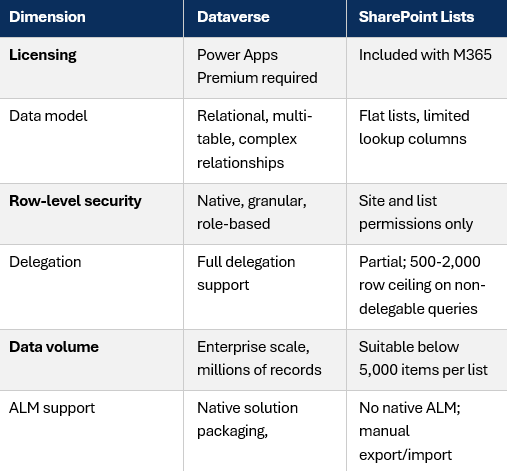
Note: SQL Server (including Azure SQL) requires Power Apps Premium for the SQL connector in all production scenarios. For on-premises SQL, an On-Premises Data Gateway is also required.
Where SharePoint Lists Hit Their Ceiling
SharePoint Lists are appropriate for lightweight, low-volume use cases: simple tracking apps, reference data, approval queues, and small team tools with a defined and bounded dataset. They are commonly misused for scenarios they were not designed to handle.
The delegation limit is the most frequently encountered problem. By default, Power Apps retrieves only 500 records from non-delegable queries, extendable to 2,000 in app settings. If the dataset has more than 2,000 records and the query is not fully delegable, the app returns incomplete results without warning the end user. An app that filters 10,000 records using a non-delegable function will appear to work correctly during testing with a small dataset, then silently return wrong results in production. This is not a configuration error; it is a structural ceiling of the SharePoint connector.
SharePoint also has no row-level security model beyond site and list permissions. Every user with access to the list sees all data in the list. For use cases involving personal data, employee information, sensitive case records, or any scenario where different users should see different subsets of data, SharePoint cannot provide that control natively.
For multi-table data models, SharePoint becomes genuinely problematic. Lookup columns provide a shallow one-to-many relationship, but they do not support the kind of normalised relational structure that most non-trivial business applications require. The workaround, maintaining multiple lists and joining them in Power Fx, introduces performance costs and complexity that compound as the application grows.
The most common SharePoint failure pattern
An app is built on SharePoint for a use case with fewer than 500 records. The use case succeeds. A second, related use case is added. A third. The dataset grows. Delegation warnings appear. Row-level security is requested. The decision is made to migrate to Dataverse. The migration is straightforward for the data. The rebuild of every app and flow that touched the SharePoint lists is not.
When Dataverse Is the Right Answer
Dataverse is the right choice when the use case has one or more of the following characteristics:
- The data model involves multiple related tables, and those relationships need to be enforced at the platform level rather than managed in formula logic.
- Row-level security is required: different users or roles should see different records based on their position, team, or permissions.
- The application needs to scale beyond several thousand records without performance degradation.
- The solution will be promoted across environments, from development through testing to production, using Power Platform ALM.
- Model-driven apps are part of the solution, which require Dataverse by design.
- Future integration with Copilot Studio, AI Builder, or Dynamics 365 is anticipated, all of which are native Dataverse consumers.
The licensing cost is the honest constraint. If users are already licensed for Power Apps Premium, or if the use case justifies that investment, Dataverse is the correct long-term foundation for any non-trivial business application. The upfront design investment required to model data correctly is real, but it is substantially cheaper than rebuilding a SharePoint-based application that has outgrown its data store.
When SQL Server or Azure SQL Is the Right Answer
SQL is the right answer when the data already exists in a production SQL database that serves as the system of record for another business system. Connecting Power Apps directly to that database avoids data duplication, preserves a single source of truth, and allows Power Platform to sit as a front-end layer over existing infrastructure rather than replacing it.
Azure SQL is also an appropriate choice for high-volume transactional use cases where the volume, query complexity, or existing database skills in the organisation make it more practical than migrating to Dataverse. SQL offers full delegation support, mature tooling, stored procedure support via Power Automate, and the ability to handle enterprise-scale data volumes.
The practical constraints to assess upfront are the premium connector requirement, which means Power Apps Premium is needed regardless, and for on-premises SQL, the On-Premises Data Gateway. The gateway is a frequently underestimated infrastructure dependency: it requires a dedicated server or VM, network access to the database, and service account configuration, with lead time that should be confirmed well before build begins.
A Practical Decision Framework
The choice of data store is not a platform preference. It is a function of use case requirements. The following questions should be answered before any data store is selected.
- Does the data model involve relationships between multiple entities, or is it essentially flat? Relational models require Dataverse or SQL. Flat data can work in SharePoint if the volume and security requirements permit.
- What is the maximum expected record count, and will that count grow? Below a few thousand records with no growth path, SharePoint is viable. At enterprise scale, or with an uncertain growth trajectory, Dataverse or SQL is the safer foundation.
- Is row-level security required? If yes, SharePoint is not an option. Dataverse or SQL with appropriate access controls is required.
- Does the data already exist in a SQL database? If yes, connecting to that database directly is often more practical than migrating it to Dataverse, provided the premium connector cost is already accounted for.
- Will the solution be promoted across environments using ALM? Dataverse is the only option with native solution packaging and environment promotion support.
- Are there compliance or audit requirements? Dataverse provides native audit history and integrates with Microsoft Purview. SharePoint audit capability is limited and depends on M365 retention policies.
- What is the full licensing picture? SharePoint has no additional cost. Dataverse and SQL both require Power Apps Premium. If Power Apps Premium is already in scope for other reasons, the incremental cost of Dataverse or SQL is zero.
The VE3 approach to data store selection
VE3's pre-discovery and readiness framework treats the data store decision as a use-case-by-use-case determination, not a single programme-wide choice. In complex programmes, the right answer is often a mixed architecture: Dataverse as the primary app data platform, SharePoint for document-centric collaboration and lightweight tracking, and SQL where data already lives in a production system that Power Platform should read from rather than replace.
The worked decision example in our Power Platform Readiness Framework illustrates exactly this rationale: no single data store meets all use case requirements, and the decision should be made per use case using a defined framework, not assumed at the start of the programme.
The Cost of the Wrong Choice
The data store decision looks like an early, low-stakes choice. In practice it is one of the most load-bearing decisions in a Power Platform programme, because everything that is built subsequently is built on top of it.
Changing a data store mid-programme is not a data migration. The data itself can usually be moved in hours. The rebuild of every app, flow, connector, and integration that references the old data store is measured in days or weeks, depending on the complexity of what was built. That cost is not in most programme plans, because the assumption is that the data store choice was right the first time.
The question to ask before build begins is not which data store is easiest to start with. It is which data store will still be the right choice when the programme is live and growing.
About VE3
VE3 is a global technology and enterprise AI consultancy working with UK public sector and enterprise organisations on Microsoft Power Platform, automation (RPA), and Centre of Excellence programmes. Our discovery-led approach turns an unclear requirement into an evidenced, costed, and risk-assessed specification. To discuss Power Platform data architecture or our pre-discovery readiness framework, contact your VE3 representative.

.png)
.png)


