.png)


A practical guide for HR and IT leaders navigating the move from on-premise SAP HCM to SAP SuccessFactors Employee Central.
For organisations that have run SAP's Human Capital Management suite for over a decade, the instruction to migrate to SuccessFactors can feel deceptively simple. The same vendor. A familiar acronym. An upgrade, surely?
It is not an upgrade. It is a platform shift — and the distinction matters enormously for the HR teams, IT centres of excellence, and senior leaders who will live with the consequences.
This article cuts through the surface-level comparisons to examine what concretely changes when an organisation moves from legacy SAP HCM on S/4HANA to SAP SuccessFactors Employee Central — and what that means in practice for payroll, time management, data, integration, and the way HR operates day to day.
1. The Architecture Is Fundamentally Different
Legacy SAP HCM — whether running on ECC or S/4HANA — is an on-premise system. The organisation owns the infrastructure, controls the update schedule, and carries the technical burden. For many large public sector organisations, this has meant running SAP on Microsoft Azure with dedicated Basis teams managing Support Pack updates, Legal Change Packs, and system landscapes across Development, Pre-Production, and Production.
SuccessFactors is cloud-native. SAP manages the infrastructure. Updates are continuous and automatic. The organisation is no longer in the business of patching software or planning upgrade windows. This removes a significant layer of technical overhead — but it also removes control. Organisations that have built their operations around tightly governed change cycles need to adapt their governance model accordingly.
Key implication
Your Basis team's role changes. The skills that kept on-premise SAP running — OS-level administration, SP management, landscape configuration — give way to a different capability mix: SF administration, integration management, and platform governance.
2. The HR Data Model Is Rebuilt From the Ground Up
In legacy SAP HCM, the data model is built around Personnel Administration (PA) and Organisational Management (OM). Employee records are structured around infotypes — discrete data objects (IT0001, IT0008, IT0041, and so on) that store everything from basic personal data to payroll-relevant information and absence quotas. Organisational structures are maintained in PPOSE and used across HR, Finance, and Procurement.
Employee Central replaces this with a position-based, object-oriented data model. The infotype framework does not exist in SuccessFactors. Instead, HR data lives in a structured set of entities — Employee Profile, Job Information, Compensation Information, Personal Information — governed by business rules and event-based workflows.
This is not a cosmetic change. It affects:
- How employee records are created, maintained, and searched
- How organisational hierarchies are built and used downstream by other systems
- How custom fields and data extensions are managed
- How audit trails and data history are maintained
For organisations with complex structures — multiple employment types, concurrent employments, external payrolls, pension payroll areas — the data model transition is one of the most technically demanding aspects of the migration. Standard SuccessFactors functionality has known limitations around multiple employment handling, and these must be identified and addressed explicitly during implementation planning.
What this means in practice
Data migration is not a lift-and-shift exercise. HR data must be mapped, transformed, and validated against the new data model before it can be loaded into Employee Central. Closed records that are not migrated must remain accessible — for data retention, subject access requests, and payroll history queries.
3. Payroll: Familiar Engine, New Environment
Employee Central Payroll (ECP) retains the SAP payroll engine at its core. Wage types, payroll schemas, calculation rules — the fundamental logic is recognisable to anyone who has worked with SAP payroll. This is deliberate: SAP carried over the proven calculation engine to de-risk migration for organisations with complex payroll requirements.
However, the environment around the engine changes significantly:
- The Payroll Control Centre replaces the traditional payroll administrator's workflow, offering a dashboard-driven approach to running, monitoring, and resolving payroll — including the ability to identify and fix errors before a live run
- Custom payroll schemas, bespoke PCRs, and Z wage types require remediation — they cannot simply be transported from S/4HANA
- The compatibility pack that many organisations currently use to run HCM on S/4HANA is a temporary bridge; SuccessFactors is the long-term destination
- Digital payslips, P60s, and payroll documents become natively available to all employees — including those currently not digitally connected to the organisation
For organisations running complex payroll — multiple employments across different payroll areas, multiple pension schemes, flexible working schemes, cross-midnight time calculations — the migration is an opportunity to rationalise, but also a risk if complexity is underestimated. The adopt-not-adapt principle applies here too: wherever possible, standard SuccessFactors payroll processes should replace bespoke logic rather than recreating it in a new environment.
Also Read: Automating Payroll Error Resolution - How SuccessFactors Payroll Control Centre Changes the Game
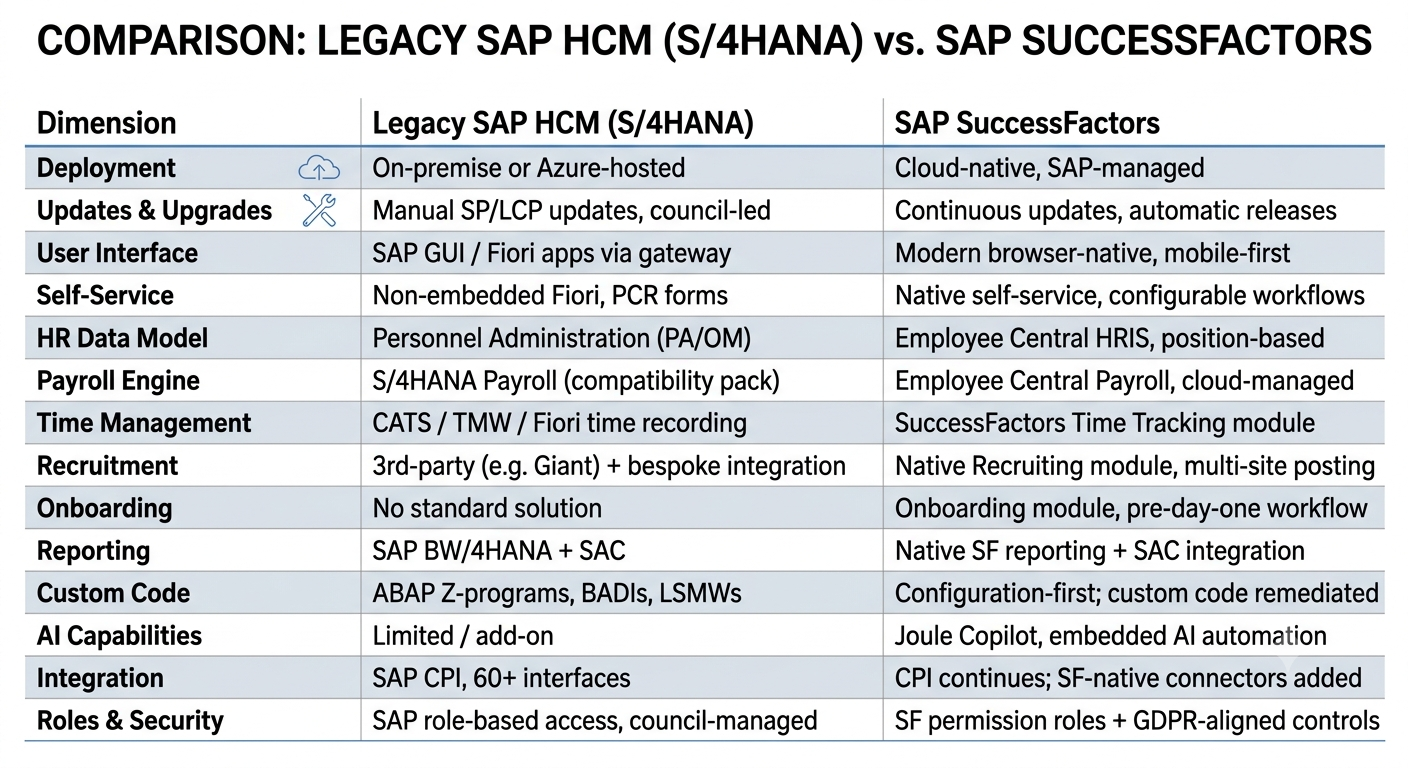
4. Side-by-Side: What Changes Across Every Dimension
The table below captures the key differences across the dimensions that matter most to HR and IT leaders:
5. Self-Service and the User Experience: A Step Change
One of the most visible changes for employees and managers is the interface. Legacy SAP HCM delivered self-service through SAP GUI or, more recently, Fiori apps deployed via a gateway — a significant improvement over the traditional interface, but still constrained by the underlying architecture.
SuccessFactors is browser-native and mobile-first by design. The employee experience — accessing payslips, requesting leave, updating personal data, managing onboarding tasks — is designed to work on any device without configuration effort. Managers gain dashboards for their teams. HR gains configurable approval workflows without ABAP development.
For organisations where a significant portion of the workforce is not currently digitally connected — school employees, external payroll staff, field-based workers — SuccessFactors' self-service model creates a genuine opportunity to extend digital access to groups who have historically been excluded from it.
The adoption risk
Better technology does not automatically produce better adoption. The user experience improvement is real, but organisations that skip structured change management — training, communication, digital support — will not realise the self-service efficiency gains the platform makes possible.
6. Recruitment and Onboarding: From Patchwork to Platform
In many legacy SAP environments, recruitment has been managed through third-party systems connected to SAP via bespoke integrations. Onboarding — where it exists at all — has typically been a combination of manual processes, email chains, and paper-based documentation. Offboarding is rarely formalised at all.
SuccessFactors changes this materially. The Recruiting module provides a unified platform for job advertising across multiple career sites from a single specification, applicant tracking, compliance governance (right-to-work, qualification checks), talent pool management, and analytics. The Onboarding module extends this into a structured pre-day-one experience for new hires, cross-boarding workflows for internal movers, and a managed offboarding process for leavers.
Critically, these modules are integrated with Employee Central and Employee Central Payroll — meaning that data entered during recruitment flows through to payroll setup without rekeying. This integration is where significant efficiency is unlocked, and where the real case for a fully integrated HCM suite is made.
7. Custom Code: The Migration Reality Check
Legacy SAP HCM environments accumulate custom code over years of operation. ABAP Z-programs, BADIs, custom LSMWs, bespoke PCRs, custom Fiori tiles — each one represents a business requirement that standard SAP did not meet at the time, addressed through development.
SuccessFactors is a configuration-first platform. Custom ABAP does not travel with you. Every piece of custom logic must be evaluated during implementation: can the standard SuccessFactors process meet the requirement? If not, can configuration achieve it? If not, is there an alternative standard SAP tool? Only where none of these options work should custom code be remediated — rewritten for the new environment.
This is not simply a technical exercise. It requires HR process owners to revisit requirements that were baked into code years ago, often without documentation, and decide which ones still reflect how the organisation wants to work. The adopt-not-adapt principle is most powerfully — and most challengingly — applied here.
VE3's perspective
Custom code remediation is where implementations most frequently underestimate effort. A comprehensive code audit early in the project — before implementation begins — is essential to avoid late-stage surprises. The goal is not to replicate the past in a new environment, but to use the migration as a forcing function for process improvement.
8. AI and What It Actually Delivers
SAP Joule — the AI copilot embedded across the SuccessFactors suite — represents a qualitative shift in what is possible within the HR platform. In legacy SAP HCM, AI was largely an add-on capability, peripheral to the core system. In SuccessFactors, it is increasingly embedded: in search, in workflow automation, in payroll error identification, in HR service delivery.
Practically, this means organisations can begin exploring AI-assisted processes from day one of go-live — automating routine HR queries, accelerating payroll exception resolution, supporting managers with embedded guidance within workflows. These are not theoretical capabilities; they are available within the platform that organisations are already paying for.
The question is not whether AI is available in SuccessFactors. It is whether the organisation has the process discipline, the data quality, and the change readiness to use it effectively.
The Bottom Line for HR and IT Leaders
The move from legacy SAP HCM to Employee Central is significant in scope, but the direction of travel is clear. The compatibility pack era is ending. Cloud-native HCM is not a direction SAP is suggesting — it is the direction the product roadmap has been moving for a decade.
For organisations currently running SAP S/4HANA with HR on a compatibility pack, the window for a managed, well-resourced migration is open now. Organisations that plan this transition carefully — with honest assessment of their data complexity, custom code burden, and change management requirements — will emerge with a genuinely more capable, more integrated, and more future-proof HR function.
Those that treat it as a straightforward upgrade will find that the gaps between expectation and reality are expensive to close after go-live.
Planning a SuccessFactors migration?
VE3 Global specialises in enterprise HR transformation, SAP SuccessFactors implementation, and the complex data and integration challenges that define large-scale migrations. If you are assessing your options or preparing for procurement, speak to our team.

.png)
.png)


