.png)


Introduction
Enterprise knowledge is often distributed across multiple repositories, making document discovery, retrieval, and analysis a time-consuming process. Critical information is typically spread across SharePoint sites, cloud storage platforms, document management systems, databases, and departmental repositories, creating knowledge silos that impact productivity and decision-making.
The PromptX Document Search Agent addresses this challenge by providing a centralized, AI-powered document intelligence platform that enables users to discover, retrieve, summarize, and interact with enterprise documents using natural language.
Built on top of the PromptX Knowledge Stack, the solution combines enterprise connectors, AI indexing, semantic search, document summarization, and contextual question answering to transform enterprise documents into an accessible and intelligent knowledge ecosystem.
What is the PromptX Document Search Agent?
The Document Search Agent is an intelligent retrieval and knowledge discovery service within PromptX that enables users to:
- Search documents using filenames, keywords, or natural language
- Discover documents across enterprise repositories
- Retrieve relevant content through semantic search
- Generate AI-powered document summaries
- Ask contextual questions on documents
- Filter search results using metadata and business tags
- Access enterprise knowledge from a single interface
Unlike traditional search systems that rely heavily on exact filenames and keyword matching, PromptX leverages AI-driven semantic understanding to identify relevant documents based on meaning and context.
Knowledge Stack: The Foundation of Document Intelligence
The Document Search Agent operates exclusively on content available within the PromptX Knowledge Stack.
Documents become searchable through:
Manual Upload
Documents can be uploaded directly into PromptX for indexing and retrieval.
Enterprise Connectors
PromptX integrates with enterprise repositories including:
- Google Drive
- OneDrive
- SharePoint
- MongoDB
- Internal Document Repositories
- Enterprise Content Management Platforms
Once ingested, documents are processed, indexed, and made available for AI-powered retrieval
End-to-End Architecture
The architecture follows a multi-stage document intelligence pipeline that transforms raw enterprise documents into searchable organizational knowledge
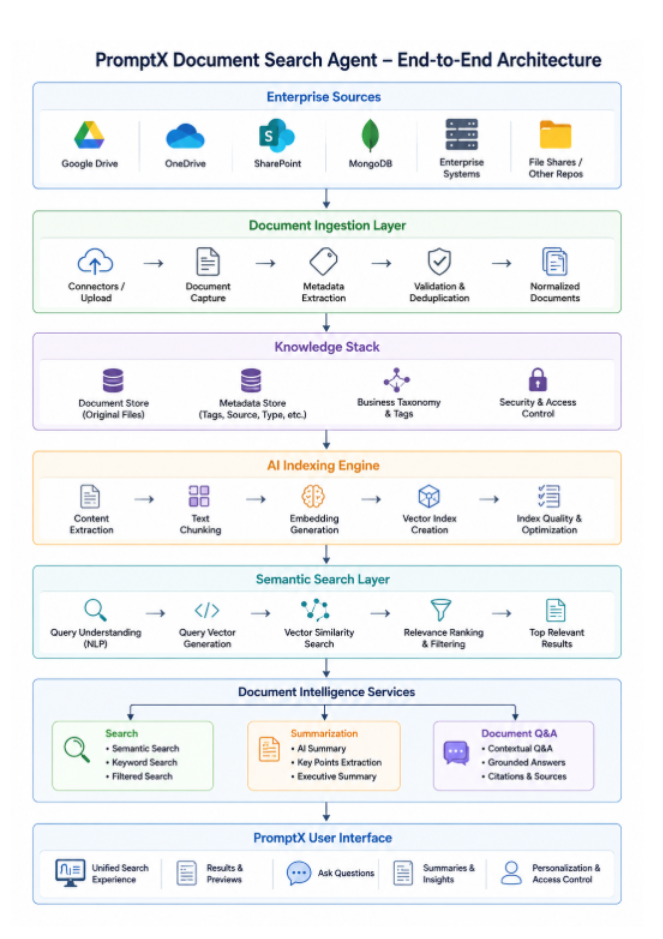
Document Search Agent Workflow
The following workflow illustrates the complete lifecycle of document ingestion, indexing, semantic retrieval, document intelligence, and AI-powered question answering.
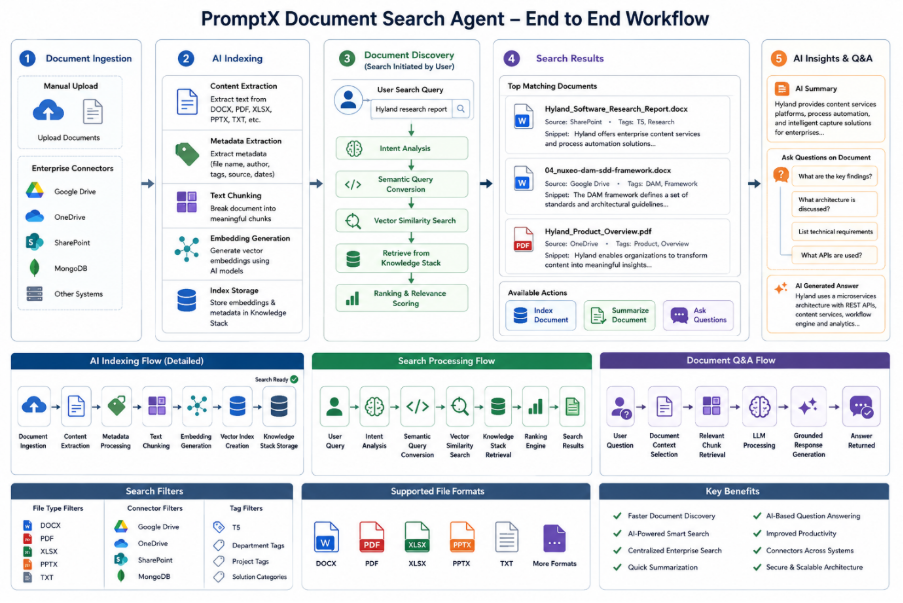
The workflow consists of five major stages:
- Document Ingestion
- AI Indexing
- Document Discovery
- Search Results Processing
- AI Insights & Question Answering
Phase 1: Document Ingestion
The document ingestion layer serves as the entry point into the PromptX Knowledge Stack.
Supported Sources
- Manual Uploads
- Google Drive
- OneDrive
- SharePoint
- MongoDB
- Enterprise Systems
During ingestion, PromptX captures:
- Document content
- Metadata
- Repository source
- File type information
- Business tags
This ensures all relevant information is available for indexing and retrieval.
Phase 2: AI Indexing
After ingestion, documents undergo intelligent preprocessing and indexing.
Content Extraction
PromptX extracts content from:
- DOCX
- XLSX
- PPTX
- TXT
- Supported enterprise formats
Metadata Processing
Additional contextual information is extracted, including:
- Document Name
- Author
- Source Repository
- Business Tags
- Department Information
- Project Associations
Text Chunking
Large documents are segmented into smaller semantic chunks to improve retrieval accuracy and contextual relevance.
Embedding Generation
PromptX generates vector embeddings using AI models that capture semantic meaning rather than simple keyword occurrences.
Vector Index Creation
Embeddings and metadata are stored within the Knowledge Stack, enabling high-performance semantic retrieval.
Key Benefits
- Faster search performance
- Context-aware retrieval
- Improved ranking accuracy
- AI-powered document understanding
Phase 3: Semantic Document Discovery
Users can initiate searches through the PromptX interface using various search patterns.
Filename Search
Example:
Hyland_Software_Research_Report.docx
Keyword Search
Example:
Hyland
Business Language Search
Example:
Digital Asset Management Framework
Enterprise Content Services
Research Reports
Semantic Search
Example:
Find documents discussing enterprise DAM architecture
The semantic search engine converts user intent into vector-based queries and retrieves the most contextually relevant documents.
Search Processing Pipeline
The search engine performs multiple retrieval stages:
Intent Analysis
Understands user intent and search context.
Semantic Query Conversion
Transforms natural language into vector representations.
Similarity Matching
Compares query embeddings against indexed document embeddings.
Retrieval
Fetches relevant content from the Knowledge Stack.
Ranking & Relevance Scoring
Prioritizes results based on contextual similarity and relevance.
This approach significantly improves retrieval quality compared to traditional keyword-based search engines.
Search Results Experience
Search results provide detailed document information including:
- Document Name
- File Type
- Content Preview
- Repository Source
- Business Tags
Users can perform additional actions directly from search results.
Available Actions
Index Document
Trigger indexing for newly added documents.
Summarize Document
Generate AI-powered summaries.
Open Document
Access source content.
Ask Questions
Launch contextual document conversations.
AI-Powered Document Summarization
Enterprise documents often contain hundreds of pages of information.
Examples include:
- RFP Responses
- Technical Design Documents
- Research Reports
- Contracts
- Policies
- Architecture Specifications
PromptX automatically generates concise summaries that highlight:
Executive Summary
Business-level overview.
Technical Summary
Architecture, integrations, APIs, and implementation details.
Key Findings
Critical insights and conclusions.
Action Items
Recommended next steps and deliverables.
This significantly reduces document review effort.
Contextual Document Question Answering
The Document Search Agent extends beyond retrieval by enabling conversational interaction with enterprise content.
Users can ask questions directly against retrieved documents.
Example Questions
- What are the key findings?
- What architecture is discussed?
- What APIs are used?
- List technical requirements.
- What is the project scope?
- What are the delivery timelines?
Q&A Processing Flow
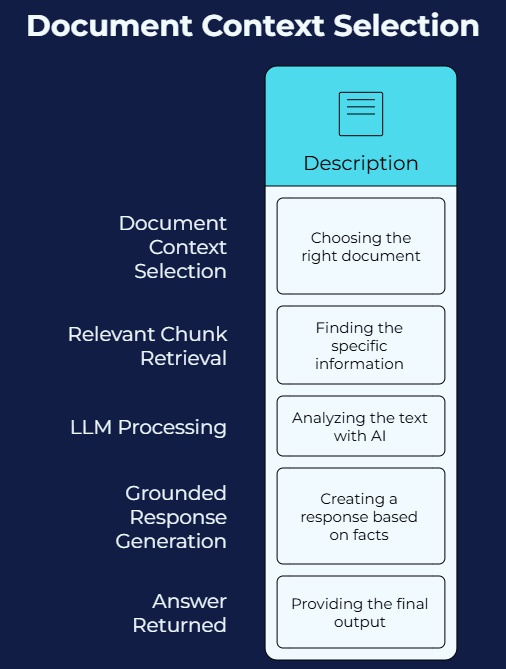
Responses are generated using document context, ensuring relevance and reducing hallucinations.
Advanced Search Filters
PromptX supports multiple filtering mechanisms to improve retrieval precision.
File Type Filters
- DOCX
- XLSX
- PPTX
- TXT
Connector Filters
- Google Drive
- OneDrive
- SharePoint
- MongoDB
Business Tag Filters
Examples:
- T5
- Department Tags
- Project Tags
- Solution Categories
These filters enable users to quickly narrow search results based on business requirements.
Business Value and Enterprise Benefits
Faster Document Discovery
Locate relevant enterprise documents within seconds.
AI-Powered Search Experience
Search using business language instead of exact filenames.
Centralized Enterprise Search
Access knowledge across multiple repositories from a single interface.
Reduced Manual Reading
Leverage AI-generated summaries and contextual answers.
Improved Knowledge Accessibility
Transform disconnected content into searchable organizational intelligence.
Enhanced Productivity
Reduce search effort and accelerate decision-making.
Practical Enterprise Use Cases
Technical Documentation Search
Retrieve:
- Architecture Documents
- API Specifications
- Integration Guides
- Design Standards
Benefit
Accelerates engineering productivity and onboarding.
RFP and Proposal Management
Search historical submissions, reusable responses, and proposal templates.
Benefit
Reduces proposal preparation effort.
Research and Competitive Intelligence
Analyze research reports and competitor documentation.
Benefit
Enables faster strategic insights.
Contract and Policy Review
Retrieve clauses, payment terms, compliance requirements, and policy details.
Benefit
Minimizes manual review effort.
Enterprise Knowledge Management
Provide a unified enterprise knowledge layer across repositories.
Benefit
Improves knowledge sharing and organizational learning.
Supported File Formats
The PromptX Document Search Agent supports:
- DOCX
- XLSX
- PPTX
- TXT
- Additional enterprise-supported document formats
Conclusion
The PromptX Document Search Agent serves as a centralized AI-powered enterprise knowledge retrieval platform that combines document ingestion, AI indexing, semantic search, document summarization, and contextual question answering into a single intelligent experience.
By leveraging the PromptX Knowledge Stack, organizations can transform fragmented repositories into a searchable, scalable, and intelligent knowledge ecosystem. The result is faster document discovery, deeper knowledge insights, improved productivity, and a modern enterprise search experience where users search for knowledge rather than files.

.png)
.png)


