.png)


Licensing is the single most common and most expensive - mistake organisations make with Power Platform. Not the technology. Not adoption. Licensing.
The reason is rarely incompetence; it is that the model gets chosen before usage is understood. A team buys per-user licences because that was the price they saw first, then finds a per-flow model would have cost a fraction as much. A “free” automation breaks the moment someone adds a premium connector. An AI agent built in an afternoon starts consuming credits no one budgeted for.
Microsoft has not made it easier: the plans were renamed, a new consumption meter arrived for AI agents, and a change landing in November 2026 will remove credits many business cases depend on. This guide explains the three core models in plain English, shows how to choose between them, and frames licensing as what it really is - a strategic decision about cost, governance and scale, not a procurement line item.
Power Automate licensing at a glance
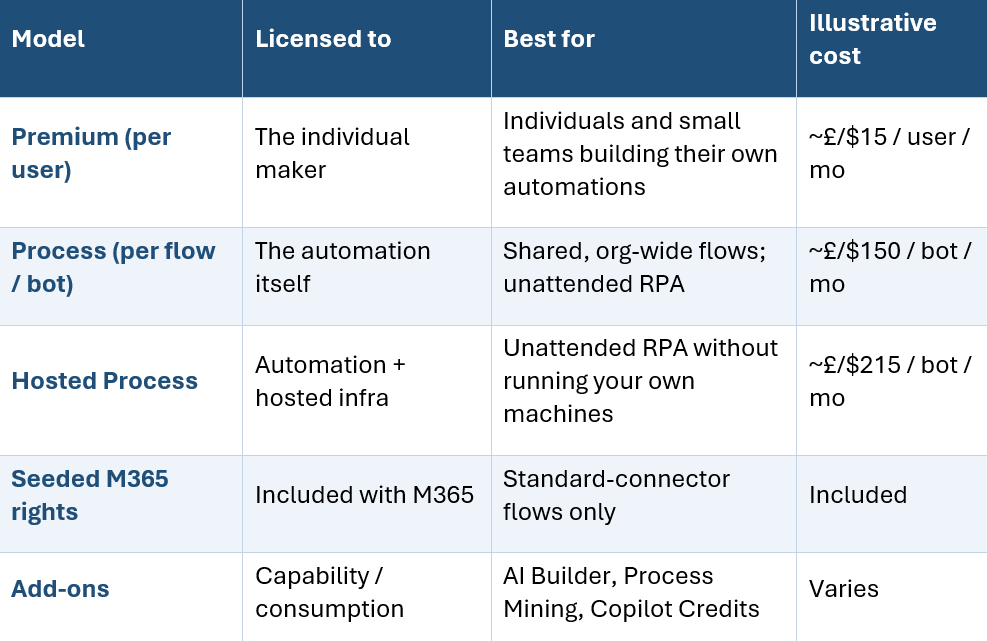
There are three core paid models, sitting on top of the entitlements you may already hold through Microsoft 365, plus an add-on layer for AI and analytics.
First, the renames - why everyone is confused
Most people are still searching for plans that no longer go by those names. “Per user with attended RPA” is now Power Automate Premium. “Per flow” is now Power Automate Process, and it is what you need for unattended desktop automation. The capabilities are broadly consistent; the labels changed. If you are working from guidance - or an internal business case - more than a year old, translate the terminology first, or “we’re already licensed for that” assumptions quietly fall apart.
What your Microsoft 365 licence already covers
Many organisations are partly licensed and do not realise it. With a qualifying Microsoft 365 subscription, you can run flows that use standard connectors - Microsoft 365, Outlook, SharePoint, Teams - at no extra cost. The line you cannot cross for free is premium connectors: Salesforce, SQL Server, SAP, Oracle, HTTP, Dataverse, custom connectors. The moment a flow touches one, it needs a paid licence.
The premium connector trap
This catches more organisations than any other licensing issue. A flow is built and tested on SharePoint, works, and goes live. Weeks later someone adds a Dataverse or SQL lookup - and it stops working for every user without a premium licence. The fix is anticipatory: know which connectors a process will eventually need before you build. That is exactly the kind of question a structured readiness assessment surfaces early, when it is cheap to answer.
Per user: the Power Automate Premium plan
Premium licenses the individual. A licensed user can build and run unlimited cloud flows, use premium connectors, and run attended desktop automation where they are signed in. It also includes a monthly allocation of AI Builder credits and some process-mining storage.
It is the right model when automation is driven by specific people - makers building several flows each, process specialists, citizen developers automating their own team’s work. The economics turn against you when an automation should serve many people: licensing two hundred staff on Premium for one shared flow is the wrong, and expensive, answer. That is what the next model solves.
Per flow: the Power Automate Process plan
Process licenses the automation, not the user. You buy capacity for a specific flow, and an unlimited number of people can benefit from it. The classic case is a shared, organisation-wide process - expense approval, customer onboarding, leave requests - where one licensed flow serves hundreds of employees.
The crossover maths
Here is the rule of thumb cost-conscious readers came for. Below roughly twenty active users on a shared flow, per-user Premium is often simplest. Above roughly thirty-five users, Process is almost always cheaper - sometimes dramatically. The instinct to “just buy everyone a licence” is what makes Power Automate look expensive; usually it is the wrong model applied to a shared-automation pattern. Work out who triggers or benefits from each flow before you decide.
RPA: attended, unattended, and the hosting question
RPA is the most misunderstood area, largely because three different things are all called “RPA”.
- Attended RPA is included in Premium - a person is signed in while it runs.
- Unattended RPA runs with no one logged in (overnight batch, back-office processing) and requires the Process plan.
- Hosted Process is Process plus Microsoft-managed cloud infrastructure, so you get unattended automation without building your own RPA server estate.
The cost driver everyone misses: concurrency, not process count
You do not licence the number of processes you automate - you licence the number of concurrent unattended runs. Ten processes that never overlap can share one bot; two that must run simultaneously need two. A team automating fifty back-office tasks may need far fewer licences than it fears - or, if everything is scheduled for the same overnight window, more than it planned. Size RPA by schedule and concurrency, not process count.
The add-on layer: where budgets actually break
The headline plan price is not the total cost of ownership. AI Builder includes a monthly credit allocation in Premium; heavy use needs paid capacity. Process Mining is a valuable but separate, significant line item. And Dataverse storage is the silent one: per-user allocations are modest, and data-heavy apps often exhaust them within weeks. Model the full cost up front, not just the per-seat price.
The new meter: Copilot, agents and agentic AI
This is the part most licensing guidance has not caught up with - and the part that will define cost control over the next two years. AI agents broke the old “count the seats” model by adding a consumption meter that charges for what agents do, not how many people have access. The currency is now Copilot Credits: pooled at the tenant level, bought via pay-as-you-go, prepaid packs or commit units. Cost depends on agent consumption, not headcount - so the right question is not the per-user price, but per agent, per conversation, per month.
One change to budget for now: the AI Builder credits seeded with premium Power Platform licences are being removed in November 2026, after which those capabilities bill through Copilot Credits at revised rates. Re-baseline any business case that assumes those credits are free. And mind the governance landmine - without controls, an employee can stand up an agent that accrues pay-as-you-go charges before IT knows it exists, with no single dashboard showing all credit consumption. Consumption pricing needs an owner, limits and visibility from day one.
A practical decision framework
Strip away the noise and the choice follows a short sequence. Work through it in order:
- Standard connectors only? Your seeded Microsoft 365 rights may be enough - start there.
- Need premium connectors (SQL, Salesforce, SAP, Dataverse, HTTP, custom)? A paid licence is mandatory.
- Individuals or everyone? Individual makers point to Premium; shared, org-wide flows point to Process (cheaper above ~35 users).
- Run unattended? Use Process or Hosted Process, and size by concurrency, not process count.
- AI agents involved? Budget Copilot Credits and put governance and consumption limits in place separately.
Licensing is a strategy decision, not a procurement line item
Total cost of ownership beats the sticker price. The real cost is the sum of seats, flows, bots, connectors, storage, AI credits and the overhead of managing it all - evaluate on TCO, not the cheapest headline number.
Licensing choices are governance choices. Unpredictable cost is usually a symptom of unpredictable governance: ungoverned makers spin up premium flows, ungoverned agents consume credits no one approved. A Centre of Excellence - clear ownership, environment strategy, DLP and consumption limits - turns automation spend from nasty surprise into planned investment.
Get it right before you commit. Most licensing mistakes are locked in at the start, when usage is assumed rather than measured, and they compound for years. A readiness assessment - mapping connectors, user volumes, concurrency, AI ambitions and governance maturity before a single licence is bought - pays for itself many times over.
The bottom line
Power Automate is not an expensive platform. The wrong model applied to the right workload is what makes it look expensive - and that mistake is almost always made at the start, before usage is understood. Use what your M365 licence already covers, choose Premium for individual makers and Process for shared flows, size RPA by concurrency, and treat AI agents as a separate, governed cost. Then decide on total cost of ownership and governance, not on the first price you see. If you want to know which model is genuinely cheapest for your usage before you commit budget, that is exactly what a readiness assessment is for.
VE3 helps organisations adopt and scale Microsoft Power Platform and automation with confidence - from readiness and discovery through to a governed Centre of Excellence. To see where your organisation stands before you commit budget, explore our free Power Platform Readiness Framework. Connect with us to know more.

.png)
.png)


