.png)


Every regulated organisation has the same bottleneck hiding in plain sight: a mountain of documents only a skilled human can make sense of — and never enough skilled humans to do it. Forms, letters, reports, scans, handwriting, opened one at a time and read line by line. Intelligent document processing exists to break that bottleneck. Here is what it is, how it works, and what separates the systems that deliver from the ones that disappoint.
Key takeaways
- Intelligent document processing (IDP) reads unstructured documents - including handwriting, and turns them into structured, decision-ready data.
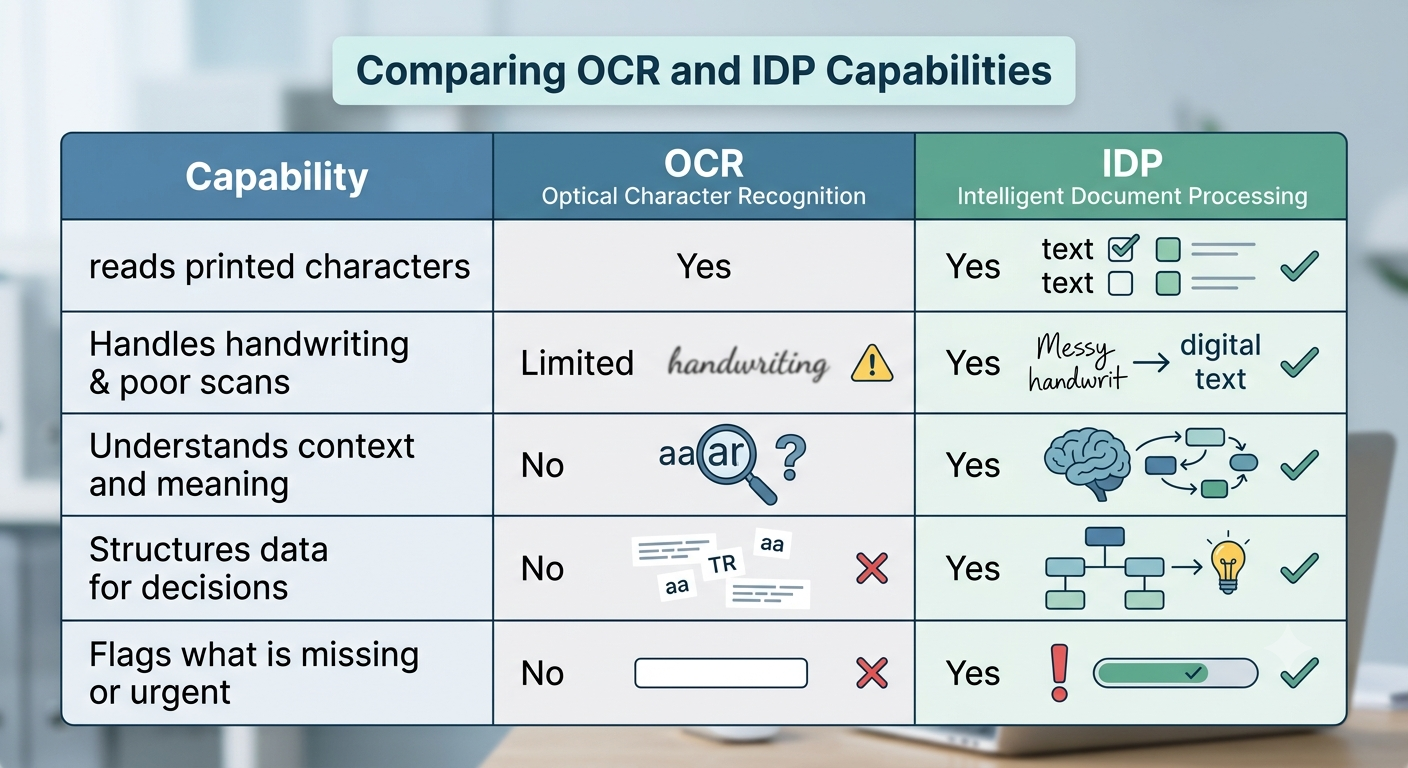
- It is not OCR. OCR transcribes characters; IDP understands meaning and context.
- A typical pipeline has four stages: ingest, enrich, summarise, and triage - with a human confirming every output.
- In regulated work, IDP must be grounded, traceable, governed and sovereign, or it never leaves the demo stage.
What is intelligent document processing?
Intelligent document processing (IDP) is technology that automatically reads unstructured documents - including scans and handwriting, extracts the information that matters, and turns it into structured, usable data. Unlike basic scanning, it understands context, not just characters.
Traditional automation handles neat, templated forms. IDP handles the messy reality: a handwritten questionnaire, a free-text clinical letter, a hundred-page evidence bundle in no particular order. It combines optical character recognition, machine learning and language models to move from “an image of a page” to “the facts on that page, ready to act on.”
Why intelligent document processing matters now
Two pressures are colliding. Document volumes keep climbing, while the specialist expertise needed to process them stays finite and expensive. At the same time, the people waiting - claimants, patients, customers; expect faster decisions, and regulators expect those decisions to be consistent and explainable. Manual triage cannot scale to meet both demands at once. IDP is the lever that lets expert capacity stretch further without lowering the standard of the decision, which is why it has moved from a back-office efficiency project to a board-level priority in document-heavy sectors.
IDP vs OCR: what is the difference?
OCR turns an image into text. IDP turns text into meaning. OCR can tell you a page says “walking limited to 50 metres.” IDP can recognise that as a mobility limitation, connect it to the rest of the case, and flag it for the right reviewer. One is a transcription tool; the other is a comprehension tool.
How does intelligent document processing work?
Most IDP systems move through four stages - an assembly line that turns raw paper into decision-ready intelligence:
- Ingest: Documents are captured as they arrive - scanned, digital or handwritten; read with multimodal OCR, and automatically categorised by type and relevance.
- Enrich: The system extracts the concepts that matter and maps them to a shared vocabulary, so “can’t walk far” and “reduced mobility” are understood as the same thing.
- Summarise: It produces a structured summary organised around the decisions a professional needs to make - with every point traceable back to its source document.
- Triage and route: It scores completeness, flags anything missing or urgent, and recommends where the case should go next.
Crucially, every output is a recommendation. A human reviews, confirms or overrides — the machine never decides.
What does IDP actually deliver?
The payoff is measured in returned time and reduced risk. Research across document-intensive sectors points the same way:
- ~5x faster intake than manual processing
- Error rates cut from around 4% to under 1%
- Return on investment typically inside 6–12 months
But the number that matters most appears on no dashboard: the specialist hours handed back to expert judgment. Done well, IDP means a professional never reads a document a machine could have summarised, with the source attached.
Where does IDP earn its keep?
The same pattern repeats across any document-heavy, regulated process:
- High-volume intake - categorising and indexing incoming documents the moment they arrive, instead of queuing them for manual sorting.
- Evidence and claims review - summarising long, mixed-format bundles into a structured view a professional can act on in minutes.
- Referral and case triage - recommending where a case should go and which specialism it needs, with the evidence attached.
- Completeness checks - catching missing documents on day one, before time is wasted on a case that cannot yet be decided.
- Audit and compliance preparation - producing a traceable record of what was read, summarised and recommended.
What separates IDP that works from IDP that disappoints?
Three things - nonoptional in regulated work:
- It is grounded. The best systems summarise only from the documents in front of them, never from the model’s assumptions. This is what retrieval-augmented generation does, and it is why hallucination stops being a risk.
- It is traceable. Every summarised point links back to its source passage, so a reviewer can verify any claim in a single click.
- It is governed and sovereign. It runs inside your own environment, keeps a full audit trail, monitors for bias, and keeps humans in the decision.
Skip any of these and you have a clever demo no auditor will sign off.
Is IDP safe for regulated, high-stakes work?
Yes - when it is built for it. Safety here means three commitments: data never leaves your security perimeter; AI recommends rather than decides wherever an outcome affects a person; and every action is logged and contestable. IDP designed around those principles does not replace expert reviewers - it clears the administrative fog so they can do the work only they can do. The organisations that get the most from it treat those commitments as non-negotiable design requirements, not features to switch on later.
Exploring intelligent document processing for a regulated, document-heavy operation? Talk to our team about a sovereign, human-in-the-loop approach, or read our guides to sovereign AI and on-premise versus SaaS deployment. Visit our AI solution

.png)
.png)


